
The Billing History section allows sellers to review their subscription charges, usage credit purchases, and related refund records. This page provides access to past billing records beyond the recent invoices shown on the Billing page.
Sellers can open this section by navigating to Billing Management → Billing History.
Billing History Table #
When a seller opens the Billing History page, they can see a table with the following columns:
- Invoice – The invoice number associated with the billing record.
- Description – What the charge or refund was for, such as a subscription renewal, plan change, or usage credit purchase.
- Billing Period – The date or date range associated with the invoice, where available.
- Amount – The invoice or refund amount. Unpaid invoices may also show the remaining amount underneath.Status – The current status of the billing record.
- Date – The date associated with the record.
- Document – Available links to view the invoice or download a PDF. Refund records may include a credit note.
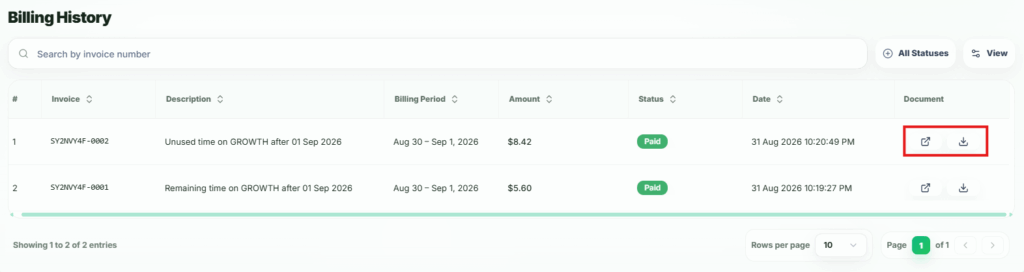
This table helps sellers review previous charges, check outstanding payments, and keep documents for accounting purposes..