
The Billing section allows sellers to manage their subscription plan, view their usage details, and change their plan as their business grows. This page provides a clear overview of the seller’s current plan, usage credit balance, and billing status, helping sellers stay informed about their usage and payments.
Billing Overview #
When a seller navigates to the Billing page, they can see:
- Current Plan – The name, price, and status of the seller’s subscription.
- Transactions This Period – The number of transactions used, including orders, resends, and replacements, out of the plan’s allowance for the current billing period.
- Connected Stores – The number of connected stores, out of the plan’s limit.
- File Storage – The amount of storage used, out of the plan’s limit.
- Renewal or End Date – The date the subscription will next renew, or the date it is scheduled to end.
- Usage Credits – The seller’s prepaid balance for extra transactions, with options to add credits and manage automatic top-ups.
- Upcoming Invoice – An estimate of the next subscription invoice
- Recent Invoices – Recent billing records, with options to view or download available invoices.
This overview helps sellers track their usage, manage their balance, and prepare for upcoming payments.
Subscription Plans and Subscribing #
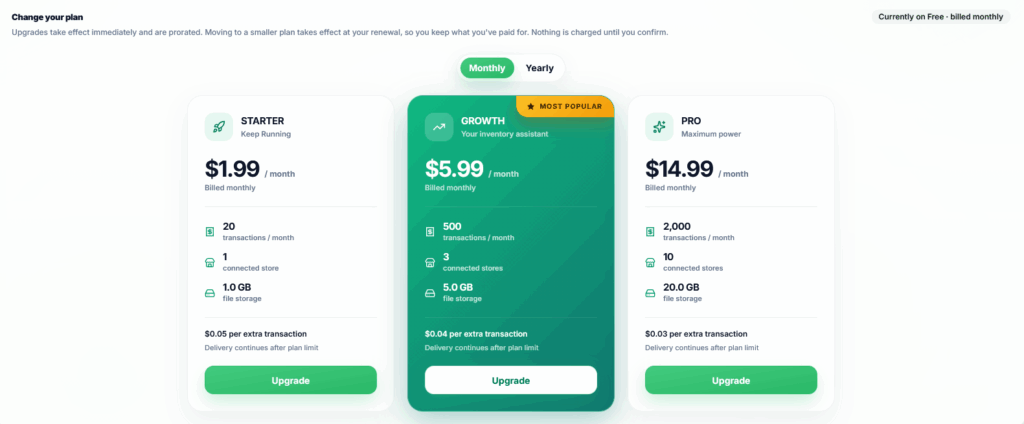
The Billing section displays the available subscription plans a seller can choose from. Each plan includes limits for transactions, connected stores, and file storage.
Sellers can select a plan and choose monthly or yearly billing where available. The selected plan’s price, limits, and any free trial offer are shown before the seller continues.
Plans with a free trial allow sellers to get started without entering credit card details. The trial duration depends on the selected plan, and a free trial is available once per account.
For plans without a trial, sellers enter their payment details and complete payment to activate the subscription. The seller’s existing connected stores and stored files must fit within the selected plan’s limits.
Free Trial and Activation #
During a free trial, sellers can use EZDZSend within the selected plan’s limits.
If the trial ends without a payment method, the subscription is paused and digital delivery stops. The seller can return to the Billing page, add a payment method, and complete payment to continue using the platform.
If a payment method is added during the trial, the subscription can renew automatically when the trial ends.
A trial that ends without a payment method does not receive the 7-day grace period provided for failed renewal payments.
Subscription Activation #
After payment is confirmed, the subscription becomes active and the seller can use the transactions, connected stores, and storage included in the selected plan.
From this point on, the subscription renews automatically at the start of each billing period unless cancellation has been scheduled. The Billing page displays the next renewal date and an estimate of the upcoming invoice.
Transaction Usage #
Each plan includes a transaction allowance for the current billing period.
The following actions each use one transaction:
- Order Delivery – Delivering a digital purchase to a customer.
- Resend – Resending a previously delivered purchase.
- Replacement – Providing a replacement for a previous purchase.
Resends and replacements count as additional transactions, separate from the original delivery.
Unused included transactions do not carry over between billing periods. The allowance resets when a new billing period starts.
Extra Usage and Usage Credits #
Once a seller uses the included transaction allowance, plans that support extra transactions allow delivery to continue through prepaid usage credits.
Usage credits are turned off by default. Sellers need to enable them and add a balance before they can be used for extra transactions.
The included allowance is used first. After that allowance is exhausted, each extra transaction deducts an amount from the seller’s credit balance at the rate set for their plan. Transactions within the included allowance do not reduce the credit balance.
If usage credits are disabled or the balance is too low, further deliveries are held until the seller adds sufficient credits, upgrades the plan, or receives a new allowance at renewal.
Plans that do not support extra transactions require the seller to upgrade or wait for the next billing period.
Purchased usage credits do not expire. However, a credit balance does not replace a subscription—the seller must still have subscription access that permits delivery.
Adding Usage Credits #
From the Usage Credits section, sellers can choose an amount to add and review the payment total before completing the purchase.
The balance is added after payment is confirmed. Any applicable tax is charged separately and is not included in the spendable credit balance.
Usage credit purchases are billed separately from the recurring subscription.
Automatic Credit Top-Ups #
Sellers can enable auto-reload to help maintain a balance for extra transactions.
The seller chooses a balance threshold and a top-up amount. When the balance reaches the selected threshold, EZDZSend attempts to charge the saved payment method and add credits.
If the payment fails, no new credits are added. Delivery is held if the remaining balance cannot cover another extra transaction.
Changing or Cancelling a Plan #
From the Billing page, sellers can manage their existing subscription as their business needs change.
Upgrade #
Sellers can move to an available larger plan and review the charge before confirming the change.
After payment succeeds, the new plan takes effect immediately. Where applicable, the charge is adjusted for the remaining time on the current plan. If payment fails, the seller remains on the current plan.
If the seller is on a free trial, upgrading ends the trial and starts the paid plan immediately.
Downgrade #
Sellers can schedule a move to a smaller plan from the Billing page. The change takes effect at the next renewal, allowing the seller to keep the current plan until then.
The seller’s connected stores and stored files must fit within the new plan’s limits before the downgrade can be scheduled.
Once scheduled, new store connections and file uploads are checked against the upcoming plan’s limits. The current transaction allowance remains available until the change takes effect.
Sellers can cancel a scheduled downgrade before its effective date.
Change Billing Interval #
Available billing interval changes depend on the seller’s current plan and selected plan.
A move from yearly to monthly billing on the same or a smaller plan takes effect at the end of the paid yearly term. Sellers on yearly billing who need a larger plan immediately can choose an available yearly option for that plan.
The effective date and any required payment are shown before the seller confirms the change.
Cancel Subscription #
Sellers can use the Manage Billing option to open the billing portal and manage cancellation.
When cancellation is scheduled for the end of the paid period, the seller keeps access until that date, subject to the plan’s allowance and available usage credits.
After the subscription ends, digital delivery requires an active subscription. An unused credit balance alone does not keep delivery active.
Update Payment Method #
The Manage Billing option also allows sellers to update their payment method through the billing portal.
If an invoice is already unpaid, the seller should check the Billing page for any payment still required after updating their details.
Payment Issues #
If a renewal payment does not go through, the seller’s account enters a 7-day grace period. During this time, the seller can continue using the platform within the plan’s allowance and available usage credit balance while resolving the payment issue.
If payment is still not received after the grace period, account access and digital delivery are restricted.
To restore access, the seller returns to the Billing page and follows the payment instructions shown for the account. During reactivation, eligible unpaid invoices for later inactive periods are cleared, and the seller is directed to the outstanding payment required to restore access.
This process is separate from a free trial ending without a payment method. In that case, the subscription pauses immediately, and the seller must add a payment method and activate the subscription.
Custom and Enterprise Plans #
Sellers whose business needs more transactions, connected stores, or storage can contact the team to discuss a custom plan.
The plan’s pricing, limits, and any additional services are agreed upon based on the seller’s requirements. Changes to an existing enterprise plan are managed through the team.