
The New Customer Records feature allows sellers to track newly acquired customers across the EZDZSEND platform. This section helps sellers understand customer growth and identify new buyers from different platforms and stores.
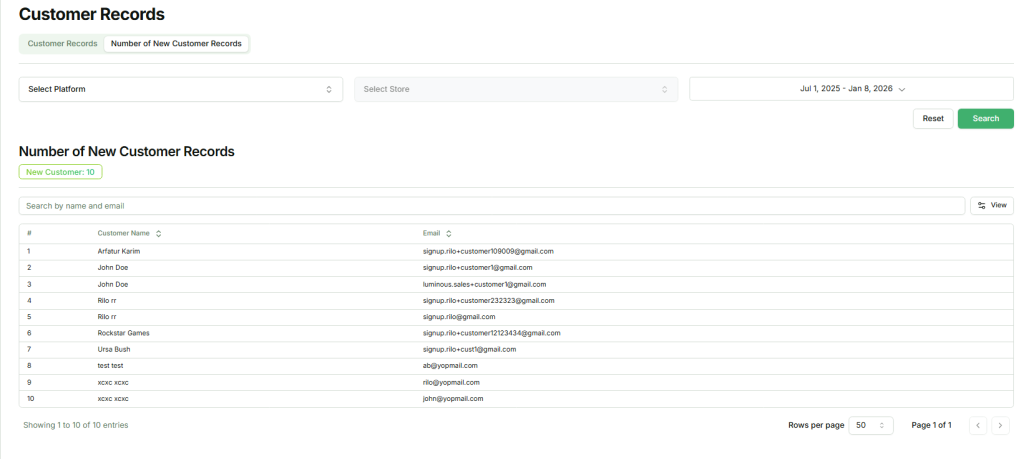
Initially, the New Customer Records page displays newly added customers from all platforms by default. This provides a quick overview of recent customer activity without applying any filters.
New Customer Records Table #
The table displays basic information for each new customer, including:
- Customer Name
- Customer Email
This simple view helps sellers quickly identify new buyers entering their system.
Filtering New Customer Records #
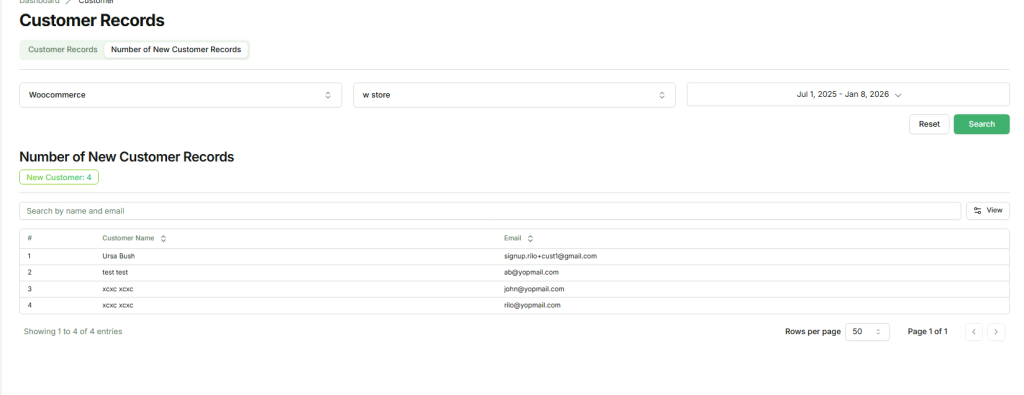
Sellers can refine the displayed data using the available filter options:
- Select Platform – Choose the platform to view new customers from.
- Select Store – Narrow results to a specific store.
- Date Range – Select the period during which the customers made their first purchase.
After selecting the desired filters, click the Search button. The system will then display new customer records according to the selected criteria.
This feature allows sellers to monitor customer acquisition trends, analyze platform or store performance, and keep track of new customers efficiently.