
The Top Inventory report shows which inventory items sold or were delivered during a selected period. It helps sellers compare orders, sales amounts, refunds, and deliveries for each item.
Go to Sales Analytics → Top Inventory to open the report. By default, it shows the last 30 days, including today, and ranks items by Sales Amount.
Filter Inventory Results
Use the filters above the table to narrow the report:
- Platform – Show activity from a selected platform.
- Store – Show activity from a specific store. Select a platform first to enable this filter.
- Inventory – Show a specific inventory item.
- Top – Limit the ranking to a specified number of items. Leave it empty to include all matching items.
- Date Range – Choose the period to review.
Click Search to apply the filters, or Reset to return to the default view.
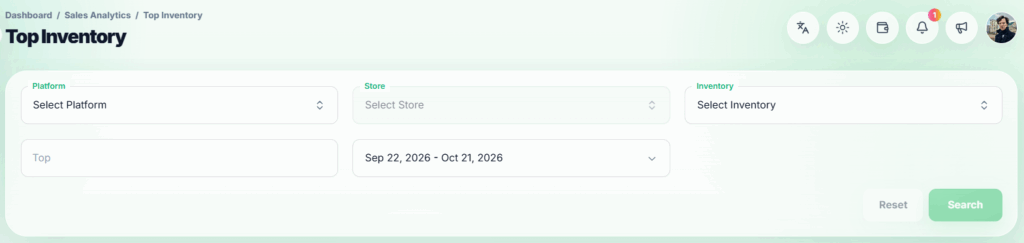
Filter section
Top Inventory Table #
The table displays:
- # – The item’s position in the full ranking.
- Inventory – The item’s name. A previously deleted item may still appear with a Deleted label so its past activity remains visible.
- SKU – The item’s SKU, when available.
- Platform – Platforms where the item was sold or delivered during the selected period.
- Orders – Successful orders containing the item. Each order is counted once for that item.
- Sales Amount – The item’s share of the amount from those orders.
- Refunded % – The item’s refunded amount divided by its sales amount. A dash appears when there is no sales amount to calculate a percentage.
- Files Sent – Files or codes delivered from that item, including items delivered as bonuses. Resends are excluded.
An item delivered only as a bonus can appear with Files Sent even if it has no orders or sales amount.
Sort and Download Results
Select Orders, Sales Amount, Refunded %, or Files Sent in the table header to rank items by that figure. The highest figure appears first.
Use the controls below the table to move between pages or change the number of rows shown. Where access is available, click Download CSV to export the full filtered ranking. The CSV also includes the refunded amount and whether an item was deleted.
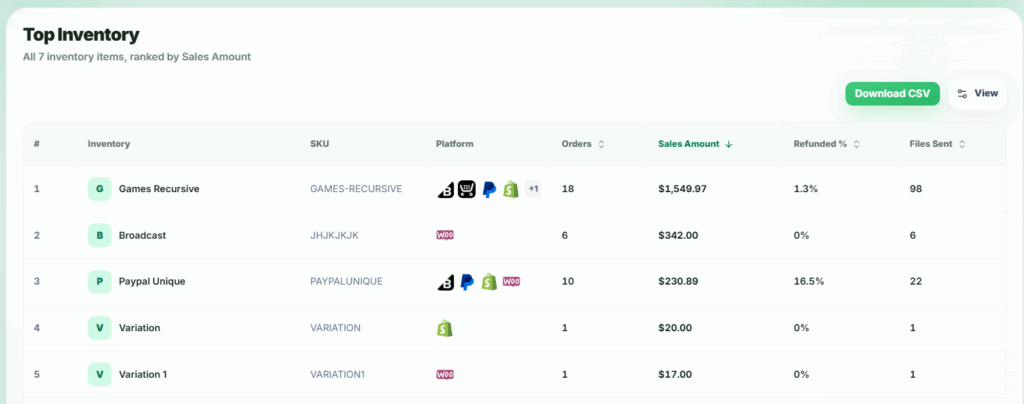
Top Inventory table